Obsidian: Templater & Other Plugins
- Tara Hodgson

- Jun 1, 2021
- 4 min read
Updated: Jun 6, 2021
Following on from last week's post taking a quick look at Obsidian , I thought I would go into the plugins - what I have, why I use them and why this makes Obsidian better than some other apps in my mind.
Templater
Starting with Templater since it's one of the first plugins I installed and possibly the main reason why I'm sticking with Obsidian.
Firstly it does have a bit of a learning curve if you're not familiar with any code, however everyone on the Discord server, forums and other online spaces discussing this are so helpful that you can get by without really knowing coding or without being familiar with things like this.

Literature Notes
It means I can make my notes from books I'm reading so much faster. I have one template called "tp_litnote" which gives me prompts for Note Title, Tags, the actual notes and then it will generate a new Literature Note with these filled in for me. Video of this process is below.
I then insert the quotes, add in the information at the top that I may need to refer to later, name the note and go from there.
EDIT: In between writing drafts of this post and hitting publish I managed to lose the link to who made the original Literature Note template that I'm using. @hstagner on Twitter is the creator
Daily Notes
I also use this plugin to write my Daily Notes. These are for me to write tasks relating to taking notes, academia and my own learning, as well as do some daily journaling. This won't include things that will go in my BuJo.
But, what I have in my daily notes is a section at the top to show Today's date, the next note and the previous note. This means that I can jump to other notes easily, and compare today with yesterday.
Journaling like this every day is great - you get to explore your own thoughts and I'm able to express anxieties about working and get them out there before I start. I highly recommend this.
Other Templates
There are also other templates that are available to use with Templater, and if you're able to then you can make your own.
I have two that I use infrequently, which give me the ability to add the title of the note into the note itself and the ability to add the current date and time. This is great for any notes I've updated as I can simply hit alt+e then select that template.
Daily Notes
This is a core plugin and one that I highly recommend if you, like me, want your to-do list in the same place to cut out swapping between apps and getting distracted by other things.
Also having a daily note gives me a great space to journal, keep track of what I'm learning and more.
So, this plugin is one I would definitely recommend to all Obsidian users.
If I'm using my daily note as a task manager then I can simply drag the note to the right sidebar, drop it into the bottom and have an easily accessible note to view whenever I need it. I could also pin it into place to be visible at all times at the side of my screren.
Admonition
When I first started using Obsidian I was sure I wouldn't use many plugins, having seen Admonition I was a bit skeptical of how useful it could be.
I got it out of curiosity and have never stopped using it:

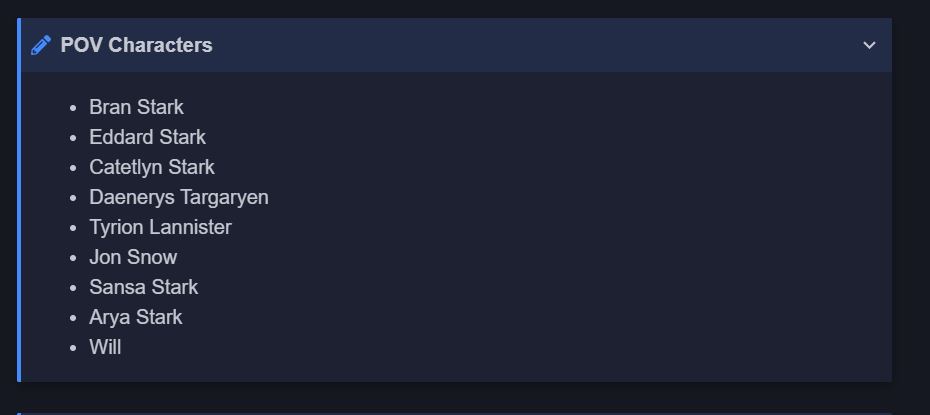
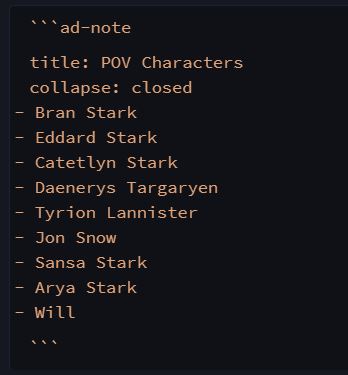
This is my map of content for my Game of Thrones page; you can see that I have collapsible lists which are something I've made using admonition. Doing it this way means I'm not worried about having to scroll through a large amount of content to be able to reach the things that I need on the page. I can simply put them in admonition blocks and go from there.


Starred
I have this plugin simply to refer back to my structure & housekeeping notes, as well as the main ones I'll be using for my thesis. I find it incredibly useful for that and am able to then not worry about making too many notes/ organising them in confusing ways with symbols in front of the titles. I can simply just swap to the starred tab and find my MOCs.
This is all too much for me to do...
It can definitely feel that way - it's easy to feel overwhelmed with the plugins and things like dataview, CSS snippets and learning how to make Templater templates. It feels like you're thrown into a massive learning curve and you don't know what to do. It's not a system that you've grown up using (like MS Word) and the amount of things possible with Obsidian are, to put it mildly, terrifying .

But, it won't stay that way forever, Obsidian is fairly new for a start, and in time these things will likely work themselves out and become more user friendly to people that don't know much about CSS and Javascript.
Obsidian hasn't been around for that long, and a lot of the progress are community driven, so there isn't as much pressure/incentive for the plugin creators to make it as user-friendly possible for everyone without coding knowledge,
we are still in the development stage of this software @yutaizhou
And, like I mentioned earlier, the community around using Obsidian is incredible. I can't count how many questions I've asked and have had answered almost straight away by people willing to help.
So, will you be trying it? Let me know in the comments!
Hey! Tara here and thanks for checking out my blog. I update every Tuesday with posts about studying tips, advice and talk about productivity and organisation too. If you want to keep up to date with my latest blog posts I’d love it if you subscribed to this blog.


Comments