Notion
- Tara Hodgson

- Mar 12, 2019
- 5 min read
A look at the all-in-one workspace that blends every day work apps into one.
Every student at one point or another in their lives has had the same dilemma – what do I use to take my class notes, write essays and keep track of everything going on in my busy schedule? For many this has been solved by the popularity in apps like Evernote and OneNote, systems like Google Drive which allow for simple documents to be written and kept in organised folders and the rise of the BuJo. But, what if I told you that there was a way you could do all of that from one simple app?

A gif found online of Notion’s capabilities
What is Notion?
Notion is a tool which has revolutionised the way that working on projects can be done. You have the ability to add members to your workspace and create together, or organise together or do whatever it is that you’re wanting to use Notion for! For me, personally, I’m using it as a way to keep my university notes organised and to write my upcoming essays and dissertation. Since all of the creating is done in easily moveable blocks it allows for whatever it is you’re working on to be changed easily and efficiently, the blocks are also a great tool because of the range of what they can do. Everything from simple text like this, to bulleted lists and even tables and calendars.
What workspaces do you use and how do you set them out?
I’ve created three workspaces on Notion, all for different purposes; one is “Home/Life” which is for anything from a recipe list to daily to do lists and tidying/cleaning lists. The other two are university focused, one for class notes and assignment plans and the other specifically for my dissertation.
Home/Life

The first image shows the ‘Home Page’ of my “Home/Life” Workspace with two columns, “Daily” and “Life”. Daily is for the to-do lists (once I make them), my recipe list for what I’m cooking and what I’ve got to tidy and where it goes. Life is for things like yearly goals, a movie tracker and eventually a book tracker (when I’m not just reading for university).
The second image above shows the Recipes page with a table. Each record once expanded has the instructions on how to make it so I don’t need to hunt online or in my cook books which is more time efficient. I’ve created two ‘tags’ next to the recipes; one so I can filter out “time consuming” or “desert” items if I want something easy and quick to make for dinner, and also a tag section for what types of food are included – chicken, sauces to go with them etc.
University
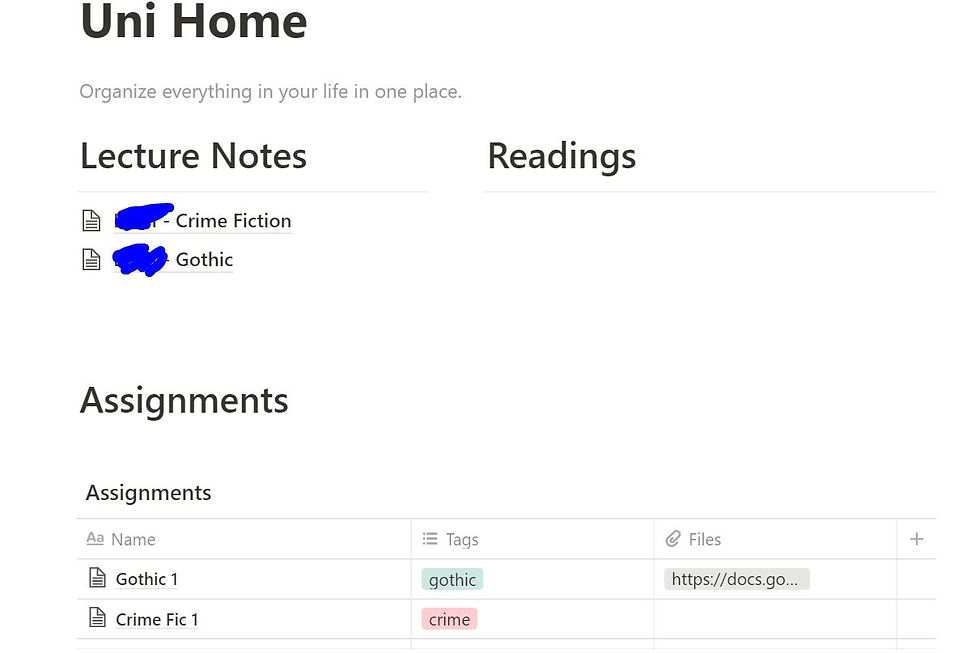
This is one of my favourite things about Notion – I can keep track of my classes much more efficiently. Each class (as shown below) has tags for lecturer and date as well as topic. So, if my Gothic lecture covered werewolves I can tag that and then easily find relevant content when I come to write my assignments. I also have a section for readings that I will be coming across during the semester and I plan for each of these to have it’s own page and be listed and colour coded according to class (green for Gothic and red for Crime Fic).
Dissertation / Thesis

So above you can see my layout for my Thesis workspace and the final of the three workspaces hat I have on Notion. Blue parts are what I’ve blocked out for privacy in what I’m deciding to write about for now, until I can get it confirmed and work on it myself.
The List of Pages is for anything that does not strictly fit into any of the chapters of my dissertation but is relevant. So a Kanban board of what I have to do, miscellaneous notes about my planned topic, notes from meetings with supervisor(s) and a word count helper (a page to break down how much I’ve written).
The other things I have on this page that are hidden by the blue blocks are details about my topic, word count and then the detailed plan under “Pages Index” which has a specific page for each chapter or section of the thesis. Each of these allows me to organise more efficiently than I could with my OneNote.
Why should I use this over any other Note-taking App?
Pros
Personally, I really fell in love with the ease of design and editing functions using Notion. I know I can easily change text type or swap paragraphs around. I can type a slash and then list and easily change to a bullet point list instead of having to stop typing and break up my work flow. I love that everything is in one, easy to access place, and I can swap between workspaces as and when needed by using my keyboard. For the images above I’ve used the “light mode” so you can see everything clearly but there is a “dark mode” feature that I find much more comfortable to write using for long periods of time. It’s like using any word processing software but combined with your file directory on your computer.
Cons
There is a 1’000 block limit on the unpaid plan which can be frustrating to those who want to use this app for many, many things. Already this workspace is at close to 200 blocks out of that 1’000 but if you’re looking to keep using this on the free version then there are ways to work around this limit – delete old to-do lists, limit sections. It’s helped me be more concise in my essay planning. Some of the features can take a while to become comfortable with, like when you type a / the list that comes up can be off-putting at first.
Final Thoughts
I’m going to keep using Notion for the next semester of classes. I love it and find that it’s exactly what I’ve been looking for in terms of Note taking and organising apps. OneNote is what I was using and found that it became a bit clunky, and I stopped using Evernote years ago in favour of that, and while OneNote is great for class notes, Notion has a slight advantage with the ability to make home pages and link to other pages from that. Each OneNote section is separate and I can’t include notes on the same page as I have a list of all the pages in the notebook (or in this case Workspace). This gives it the slight edge over other apps for me at this point.


Comments